 博客详情
博客详情
springcloud(四)--服务消费者restTemplate+ribbon (原创)
发布时间:2018-08-18 09:23:28 文章分类:springcloud 阅读(1392) 评论(0)
SpringCloud中消费者组件大概有restTemplate+ribbon 和Fegin 两种。 本篇中我们介绍下restTemplate+ribbon ,下一篇我们介绍Feign 。
一、Ribbon是什么?
Ribbon是Netflix公司开源的一个负载均衡的项目,它是一个客户端负载均衡器,运行在客户端上。它是一个经过了云端测试的IPC库,可以很好地控制HTTP和TCP客户端的一些行为。 Feign已经默认使用了Ribbon。
它的特点如下:
负载均衡
容错
多协议(HTTP,TCP,UDP)支持异步和反应模型
缓存和批处理
Ribbon在Netflix中是个非常重要的一个组件,RestTemplate 通常和Ribbon相结合作为服务消费者,以及在在Zuul中使用Ribbon做负载均衡等。
好了,废话不多讲,我们直接上代码, 本篇我们需要修改sim-consumer的代码。
sim-consumer中pom.xml配置 新加,
<!-- eureka 客户端starter 自动化配置 -->
	     <dependency>
		    <groupId>org.springframework.cloud</groupId>
		    <artifactId>spring-cloud-starter-eureka</artifactId>
		</dependency>
		<!-- actuator监控引入 -->
		<dependency>
		    <groupId>org.springframework.boot</groupId>
		    <artifactId>spring-boot-starter-actuator</artifactId>
		</dependency>
		<!-- starter-ribbon 客户端消费者引入 -->
		<dependency>
            <groupId>org.springframework.cloud</groupId>
            <artifactId>spring-cloud-starter-ribbon</artifactId>
        </dependency>
application.yml配置
#服务器基本配置
server:
  port: 80
  context-path: /


#devtool 热加载工具
spring:
  devtools:
    restart:
      enabled: true
      exclude: resources/**
#spring应用名称  、实例id配置
  application:
    name: sim-consumer

eureka:
  instance:
    hostname: localhost  #eureka客户端主机实例名称
  client:
    service-url:
      defaultZone: http://localhost:8761/eureka


info:
   groupId: com.tingcream.sim
   artifactId: sim-consumer
   version: 0.0.1-SNAPSHOT
   developer: 张三
   email: zhangsan@example.com
springboot启动类 SimConsumerApp.java
package com.tingcream.simConsumer;

import org.springframework.boot.SpringApplication;
import org.springframework.boot.SpringBootConfiguration;
import org.springframework.boot.autoconfigure.EnableAutoConfiguration;
import org.springframework.boot.builder.SpringApplicationBuilder;
import org.springframework.boot.web.support.SpringBootServletInitializer;
import org.springframework.cloud.client.discovery.EnableDiscoveryClient;
import org.springframework.context.annotation.ComponentScan;
import org.springframework.context.annotation.ImportResource;

@SpringBootConfiguration
@EnableAutoConfiguration
@ComponentScan

//@EnableEurekaClient
@EnableDiscoveryClient
public class SimConsumerApp extends SpringBootServletInitializer{

    @Override
	protected SpringApplicationBuilder configure(
			SpringApplicationBuilder builder) {
    	 return builder.sources(SimConsumerApp.class);
	}

	public static void main(String[] args) {
        SpringApplication.run(SimConsumerApp.class, args);
    }

}
MyConfiguration.java
package com.tingcream.simConsumer.configuration;


import org.springframework.cloud.client.loadbalancer.LoadBalanced;
import org.springframework.context.annotation.Bean;
import org.springframework.context.annotation.Configuration;
import org.springframework.web.client.RestTemplate;

@Configuration
public class MyConfiguration {

	/**
	 * 调用rest服务模版对象
	 */
	@Bean
	@LoadBalanced //加入负载均衡
	public RestTemplate restTemplate(){
		return new RestTemplate();
	}


}
修改StudentConsumerController.java
package com.tingcream.simConsumer.controller;

import java.util.List;

import org.springframework.beans.factory.annotation.Autowired;
import org.springframework.web.bind.annotation.GetMapping;
import org.springframework.web.bind.annotation.PathVariable;
import org.springframework.web.bind.annotation.PostMapping;
import org.springframework.web.bind.annotation.RequestMapping;
import org.springframework.web.bind.annotation.RestController;
import org.springframework.web.client.RestTemplate;

import com.tingcream.simBase.model.Student;

@RestController
@RequestMapping("/student")
public class StudentConsumerController {


	@Autowired
	private RestTemplate restTemplate;


 	private  String  PRE_URL="http://SIM-PROVIDER/";//SIM-PROVIDER是eureka中注册的服务名称


	/**
	 * 学生列表  list
	 * @return
	 */
	@SuppressWarnings("unchecked")
	@GetMapping("/list")
    public List<Student> list(){
        return restTemplate.getForObject(PRE_URL+"/student/list", List.class);
    }

    /**
     * 根据id查询一个学生
     * @return
     */
    @GetMapping(value="/get/{id}")
    public Student get(@PathVariable("id") Integer id){
        return restTemplate.getForObject(PRE_URL+"/student/get/"+id, Student.class);
    }

    /**
     * 根据id删除一个学生
     * @return
     */
    @GetMapping(value="/delete/{id}")
    public boolean delete(@PathVariable("id") Integer id){
        return restTemplate.getForObject(PRE_URL+"/student/delete/"+id, Boolean.class);
    }


	/**
     * 添加学生
     * @param student
     * @return
     */
    @PostMapping(value="/save")
    public boolean save(Student student){
    	return restTemplate.postForObject(PRE_URL+"/student/save", student, Boolean.class);
    }


    /**
     * 修改学生
     * @param student
     * @return
     */
    @PostMapping(value="/update")
    public boolean update(Student student){
    	return restTemplate.postForObject(PRE_URL+"/student/update", student, Boolean.class);
    }
}
注意,PRE_URL 修改为了 http://SIM-PROVIDER/ ,其中SIM-PROVIDER为sim-provider应用向Eureka服务器注册的服务名称,在消费者端可以通过应用名称访问服务提供者提供的服务接口。
ok,我们再次启动SimConsumer,访问即可。
-------------------------------
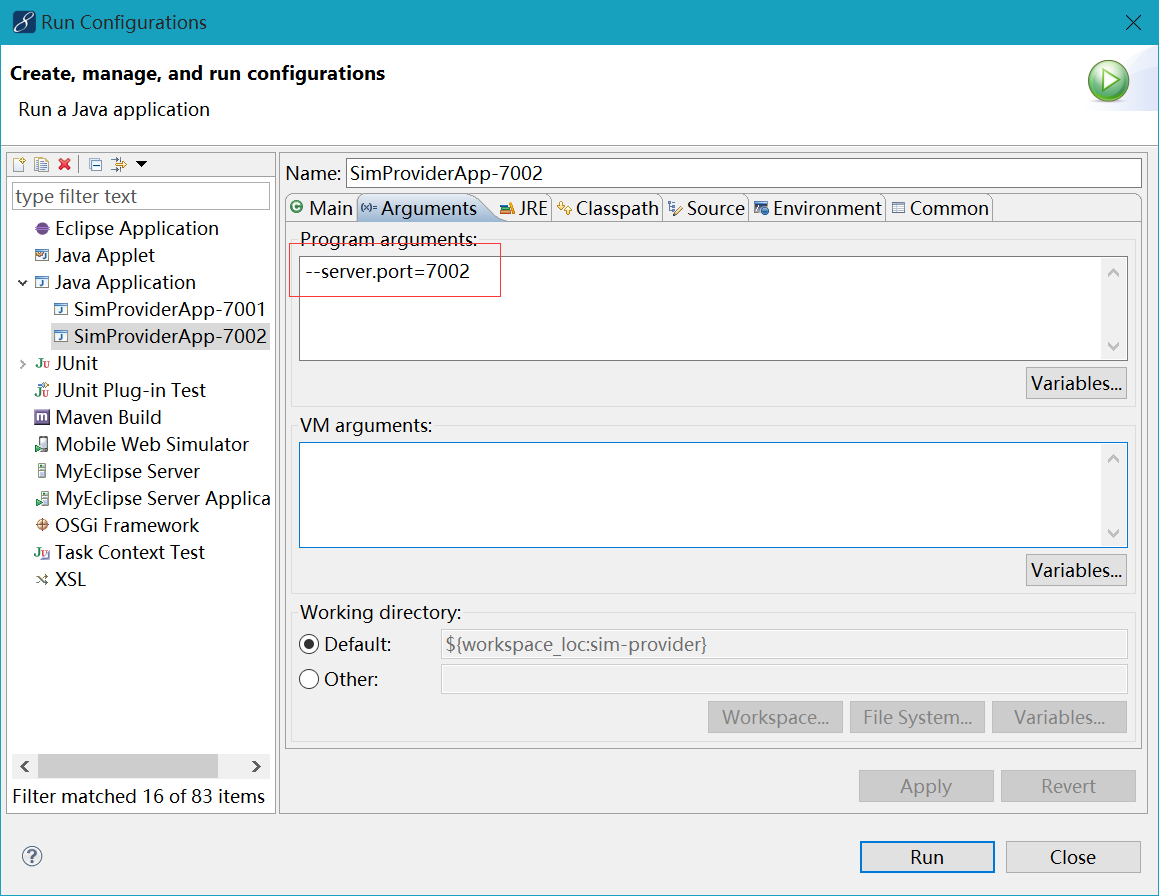
为了让演示负载均衡的效果,我们让sim-provider运行两个实例,端口分别为7001、7002 。
运行7002的实例,在eclipse中,右键run AS -- configure 在运行程序时添加一个程序参数 --server.port=7002 ,或者添加VM参数-Dserver.port=7002 即可。
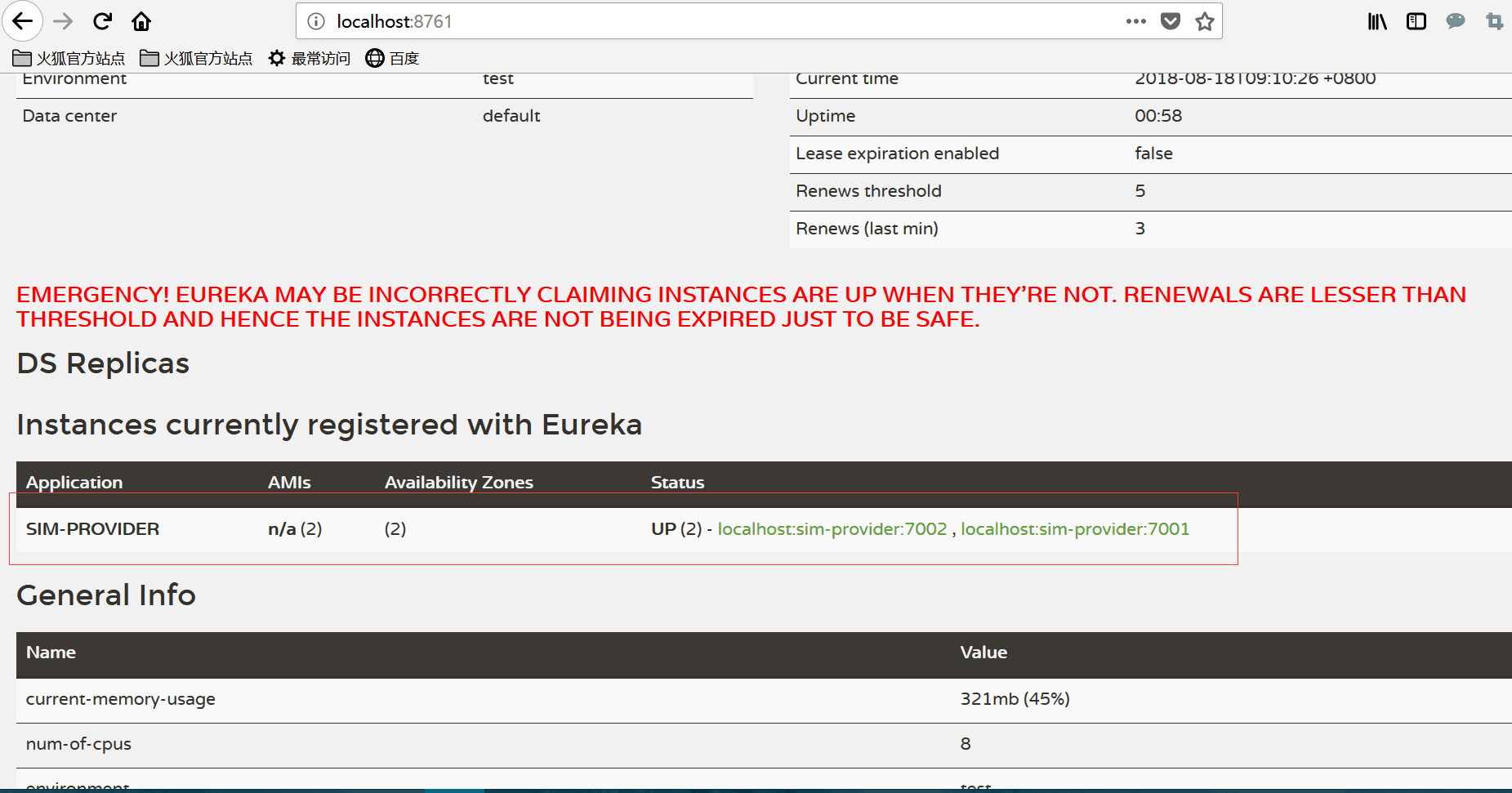
再次访问Eureka 服务器后台界面,发现 SIM-PROVIDER 有了两个服务实例
sim-provider中新加HelloProviderController
package com.tingcream.simProvider.controller;

import org.springframework.beans.factory.annotation.Value;
import org.springframework.web.bind.annotation.GetMapping;
import org.springframework.web.bind.annotation.RestController;

@RestController
public class HelloProviderController {


	@Value("${spring.application.name}")
	private String applicationName;

	@Value("${server.port}")
	private String port ;

	@GetMapping("/hello")
	public String  hello(){
		return "你好,我是:"+applicationName+",服务端口:"+port;
	}

}
sim-consumer中新加HelloProviderController
package com.tingcream.simConsumer.controller;

import org.springframework.beans.factory.annotation.Autowired;
import org.springframework.web.bind.annotation.GetMapping;
import org.springframework.web.bind.annotation.RestController;
import org.springframework.web.client.RestTemplate;


@RestController
public class HelloConsumerController {

	private  String  PRE_URL="http://SIM-PROVIDER/";

	@Autowired
	private RestTemplate restTemplate;

	@GetMapping("/hello")
	public String  hello(){

	  return 	restTemplate.getForObject(PRE_URL+"/hello", String.class);

	}

}
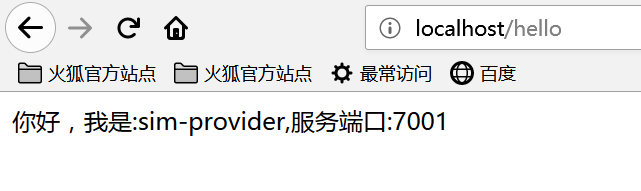
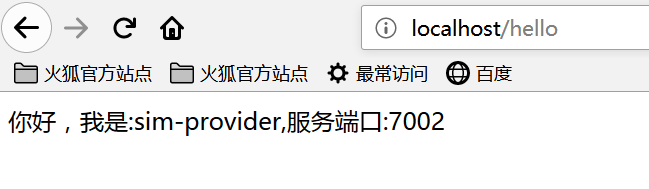
启动Eureka Server,再分别启动sim-provider应用7001、7002 两个实例,再启动sim-consumer应用。浏览器访问http://localhost/hello ,不断刷新页面时,会发现这次访问的是7001的服务,下次访问的就是7002的服务,这就是负载均衡的效果。
 评论信息
评论信息
 发表评论
发表评论
 博主信息
博主信息

数据加载中,请稍候...
 文章分类
文章分类
数据加载中,请稍候...
 阅读排行
阅读排行
数据加载中,请稍候...
评论排行
数据加载中,请稍候...
